Anyone who regularly charges an electric vehicle – whether at home in an underground car park, at work or at a publicly accessible charging station – wants one thing above all: a simple and straightforward charging experience.
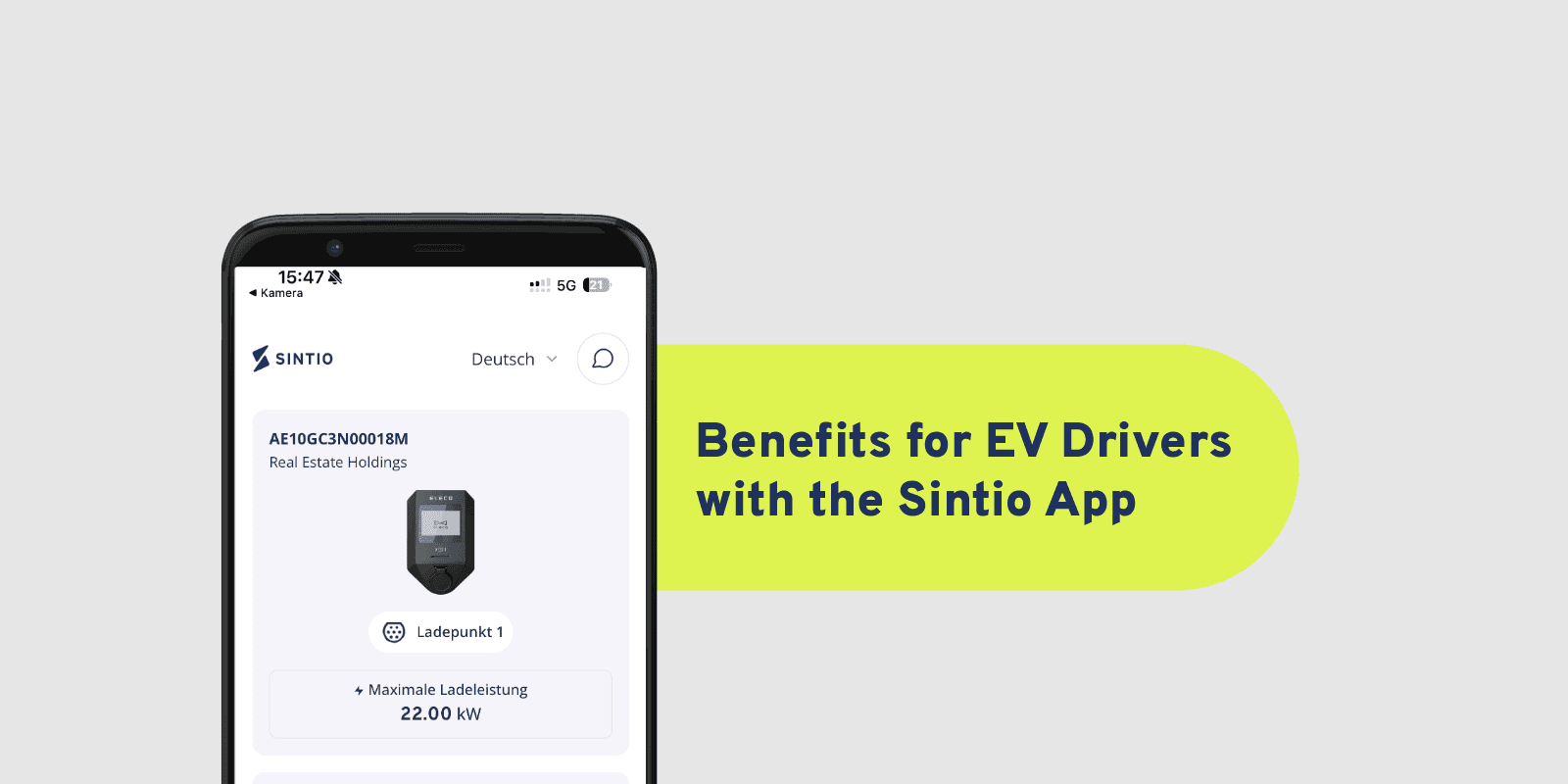
This is exactly where the Sintio app comes in. It brings together essential functions for charging, payment and charging station management in one central application. Users can find their charging stations, subscriptions, tariffs and invoices all in one place and access important functions directly through the app.
In this article, we explore the features that make everyday EV charging particularly simple and transparent.
Start a charging session in just three steps
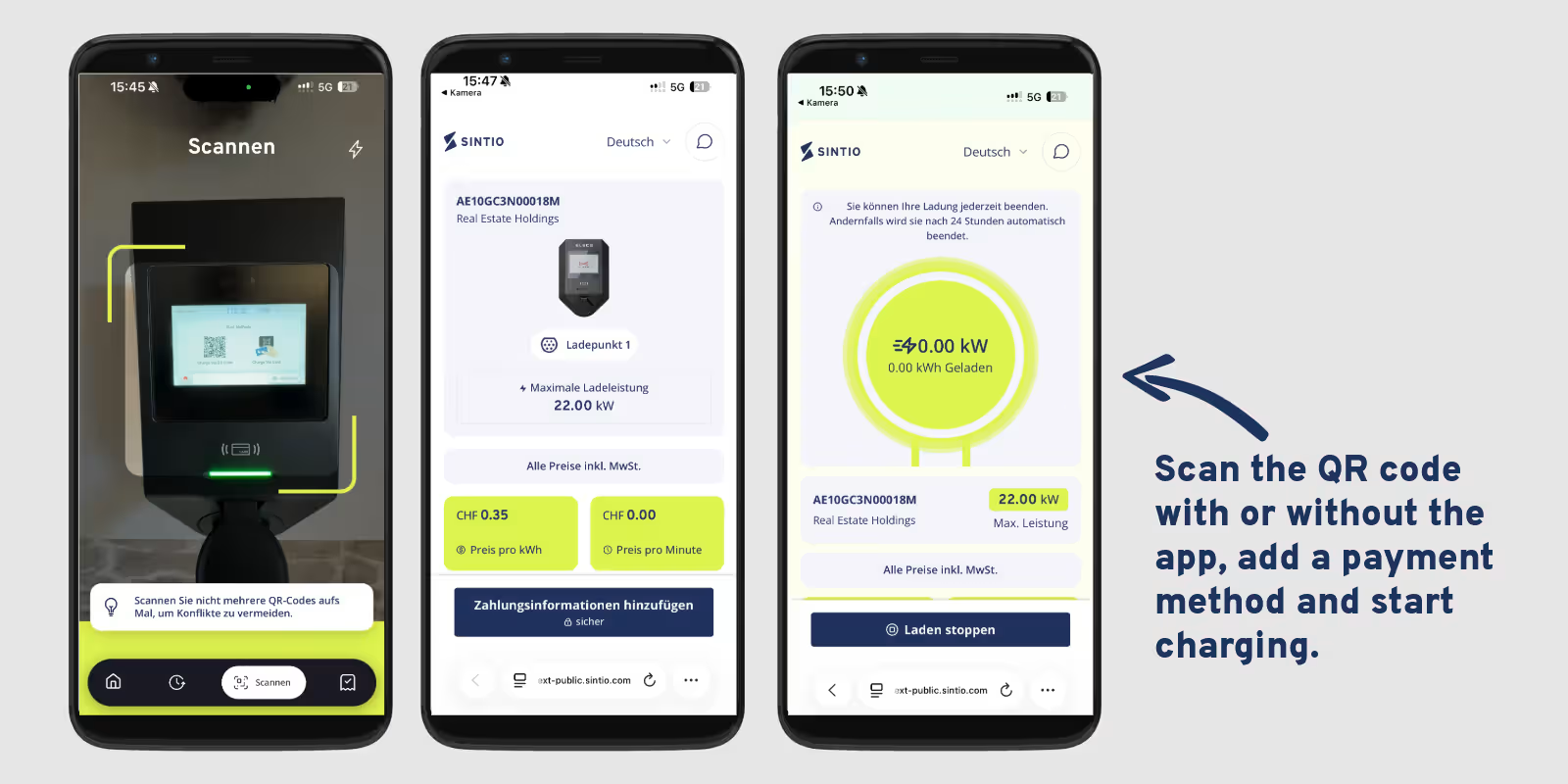
Starting a charging session should be quick and straightforward. With Sintio, charging can be started in just three steps:
- Scan the QR code
- Select a payment method
- Start charging
This allows users to charge their electric vehicles without navigating complicated menus.
Another advantage: the QR code can be scanned and verified directly through the app. This makes it possible to check whether the QR code is valid and belongs to the corresponding charging station.
Especially at publicly accessible charging stations, this ensures a simple and secure start to the charging session.
Popular Swiss payment methods – including TWINT
Having a flexible choice of payment methods is an important part of a convenient charging experience for many users.
The Sintio app supports various popular payment methods in Switzerland, including credit cards, Apple Pay and Google Pay. One particularly convenient option is the ability to pay directly at the charging station using TWINT.
Users can therefore choose the payment method that suits them best instead of being limited to a single option.
This makes the payment process especially simple and quick for spontaneous charging sessions or when using publicly accessible charging stations.
Subscriptions and ongoing costs at a glance
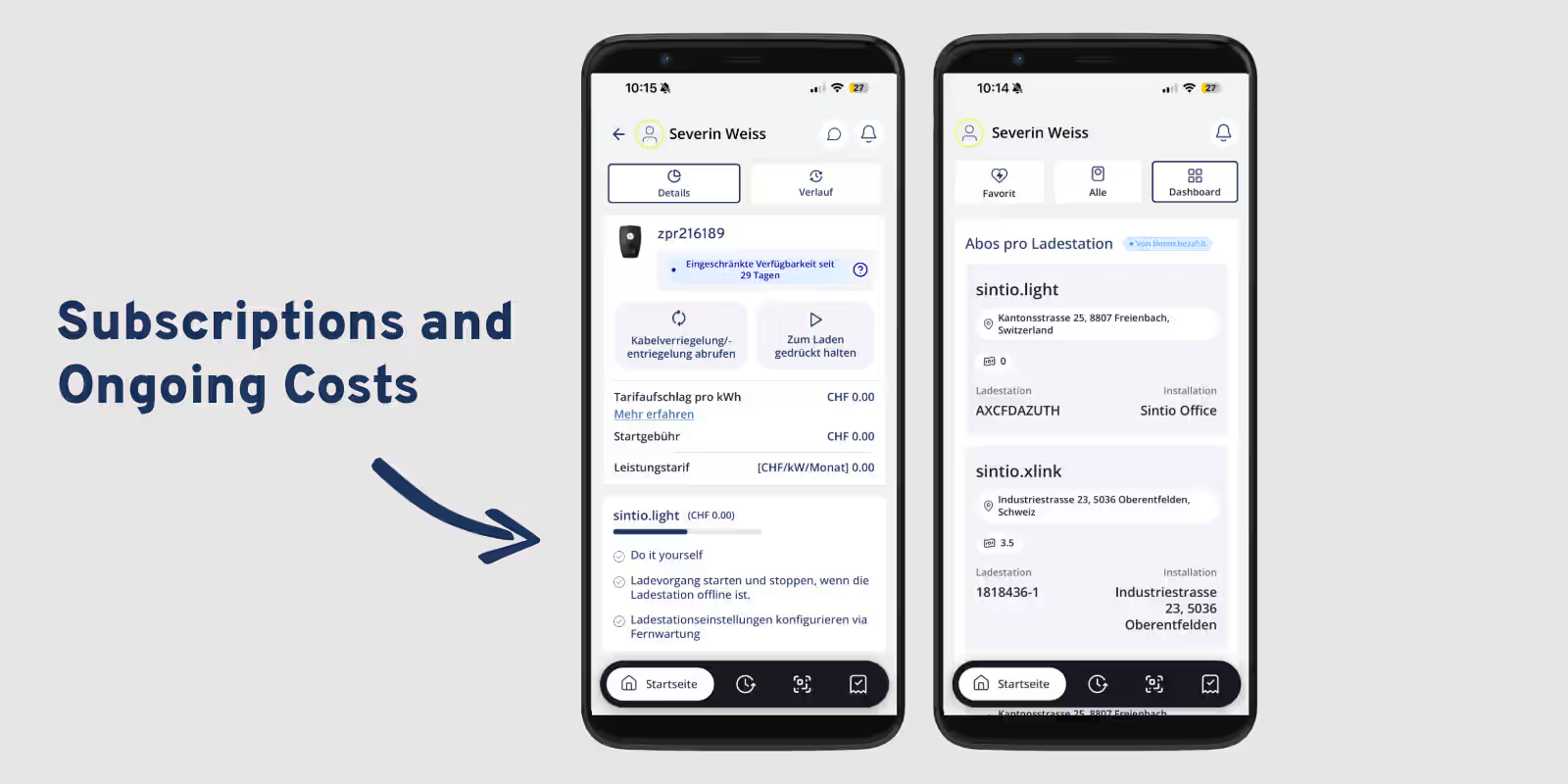
Transparency plays an important role in EV charging. That's why the Sintio app displays users' subscriptions for each charging station directly in the dashboard.
Users can immediately see which subscription is assigned to which charging station or installation.
Depending on the subscription model, different cost components may apply, such as:
- Basic subscription fee
- Meter rental
- Internet costs
- Other subscription-related fees
Instead of having to search for this information in different places, all relevant details are conveniently available in the app.
This helps users keep better track of the ongoing costs associated with their charging station.
Transparent tariff information
In addition to subscription costs, the Sintio app also provides a clear overview of relevant tariff details.
These may include:
- Price per kWh
- Tariff surcharge per kWh
- Starting fee
- Power-based tariff
- Tariff validity period
This allows users to quickly understand which tariff currently applies to their charging station and how the costs are calculated.
Transparent information is particularly important for power-based tariffs. Instead of searching through contract documents for tariffs or fees, users can view all relevant details directly in the app.
Find invoices and receipts directly in the app
Even after charging, all important information remains easily accessible.
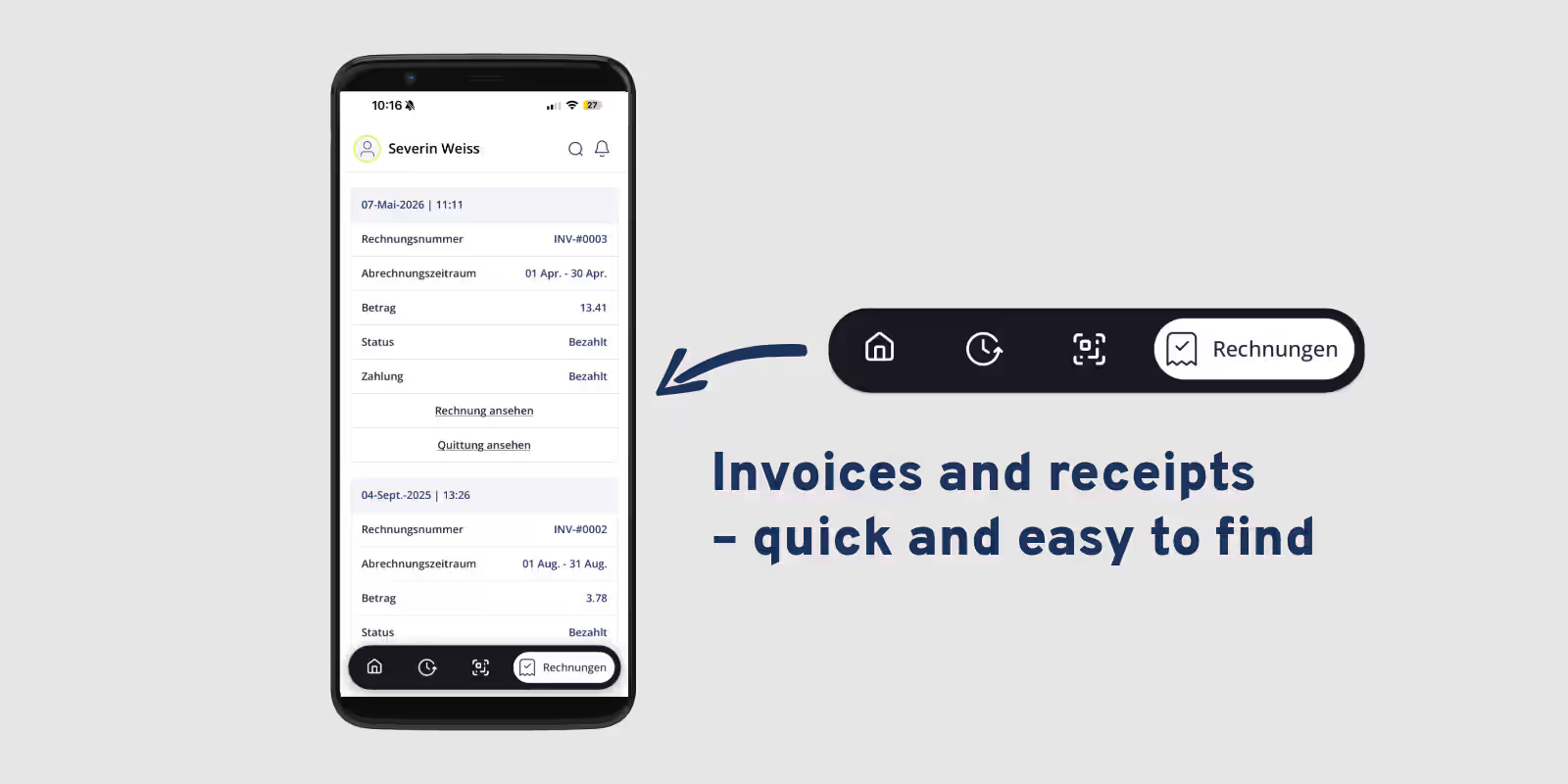
In the Invoices section, users can view their previous billing statements directly in the Sintio app.
The information displayed includes:
- Invoice number
- Billing period
- Invoice amount
- Payment status
Invoices and receipts can also be opened and downloaded directly.
This is particularly useful when a document is needed for personal records, accounting or expense reimbursement. Instead of searching through emails for old invoices, users can find all their documents in one central location within the app.
All important charging station information in one place
In addition to costs and billing, the Sintio app provides a central overview of the user's charging station.
Depending on the configuration, users can see information such as:
- Which charging station is assigned to their account
- Which installation the charging station belongs to
- Total energy consumption to date
- The currently applicable tariff
- The charging station's current status
This provides a clear overview of the most important information relating to their charging point.
Greater transparency regarding faults and availability
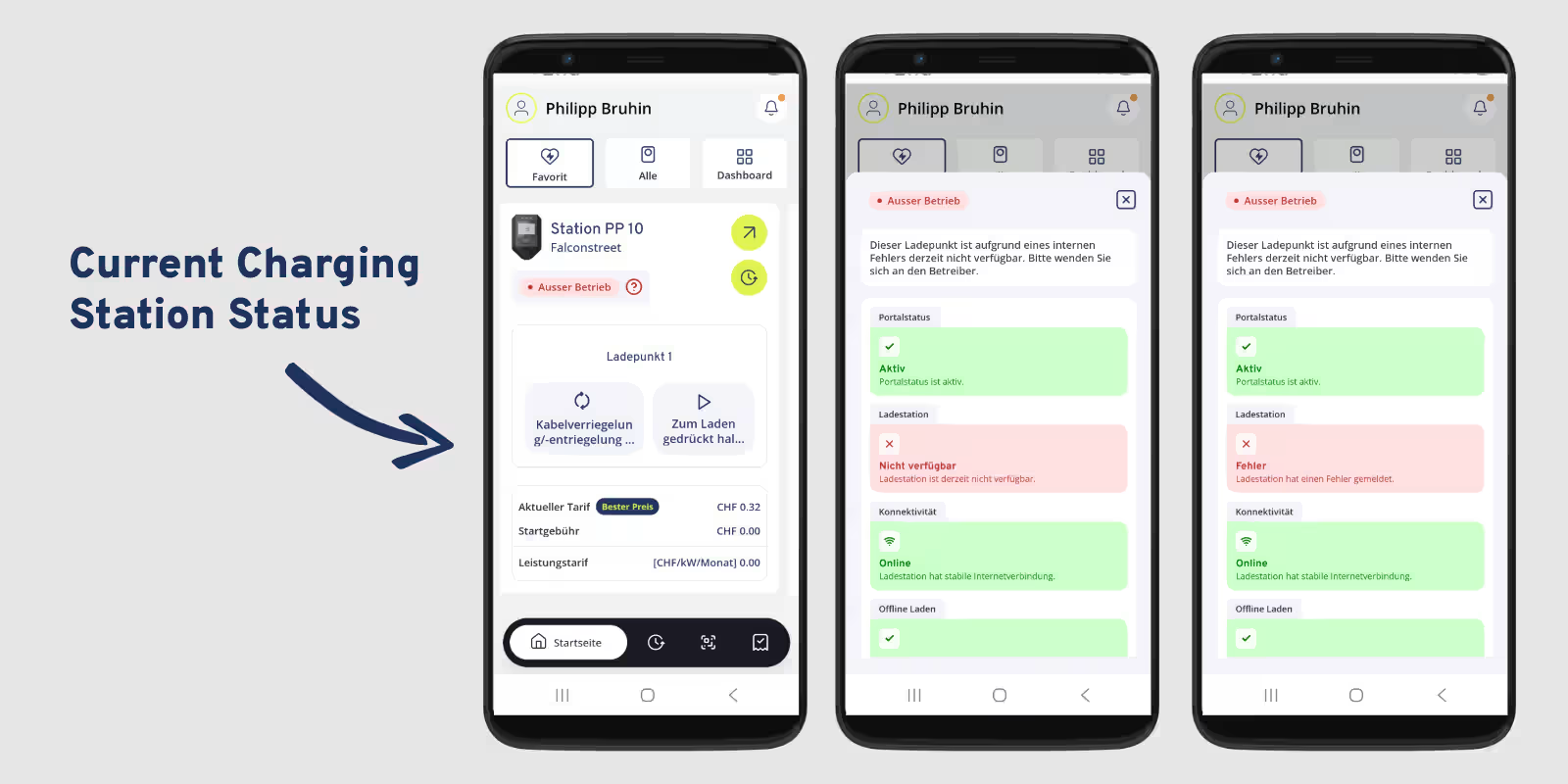
The current condition of a charging station can also be checked in the app.
If a charging station has limited availability, for example, the corresponding status is displayed directly. This gives users an early indication of potential issues rather than discovering that a function is unavailable when they try to use it.
Depending on the charging station and user permissions, additional control or remote maintenance functions may also be available.
Intuitive operation for everyday charging
For an e-mobility app, it's not just the range of features that matters – ease of use is equally important.
That's why the Sintio app features clear navigation and well-organised sections. Key functions such as the dashboard, charging stations, charging sessions and invoices are easy to access.
This makes the app suitable for both experienced EV drivers and people who are just starting to charge an electric vehicle regularly.
The goal: as few steps as possible between the user and the charging session.
Conclusion: Charge, pay and manage everything in one app
The Sintio app combines the most important functions for electric vehicle charging in one central application.
Users benefit from a simple charging process, popular payment methods such as TWINT, transparent tariff information and a clear overview of their subscriptions and costs.
Invoices and receipts are also easy to find at any time. At the same time, users have access to important information about their charging station and its current status.
The result is a charging experience that is not only simple when starting a session but also remains transparent afterwards.
In short: scan, pay, charge – and always stay in control.